I interpreted that step as "once you click 'Auto Input Levels', drag the center triangle of the 3 at the bottom of the histogram to where you think the median of the histogram is". That middle slider defaults to being the midpoint of the other 2 sliders. I'm not sure if there is a smarter way to move it to the median beyond "looks about right".
I got this as a result https://i.imgur.com/RsXx3y2.jpeg and it certainly doesn't preserve the color of the rest of the image (there are probably more algorithmic steps needed for that) but it does seem to make highlight the same faint patterns much more clearly.
The levels tool maps a subset of the channel range to the full range, effectively changing the brightness and contrast in one step.
The center point controls the gamma correction, so you can map a biased distribution (mostly bright or dark for example) to be more evenly distributed.
That was the purpose of that step - move the midpoint slider to about where the peak in the histogram is, to get an evenly distributed range.
The low/high slider can be moved towards that to increase the contrast.
"Contrast" here will only apply to the A/B channels, which is the color information, so it's increasing the color contrast and unbiasing it, while keeping the luminance information.
Photoshop also can do the same transform, and interactively in the LAB colorspace (no need to combine/uncombine the channels first).
Even if the information is accurate, I'm calling it low effort slop... Smart LLMs have basically automated producing a plausible looking "content farm".
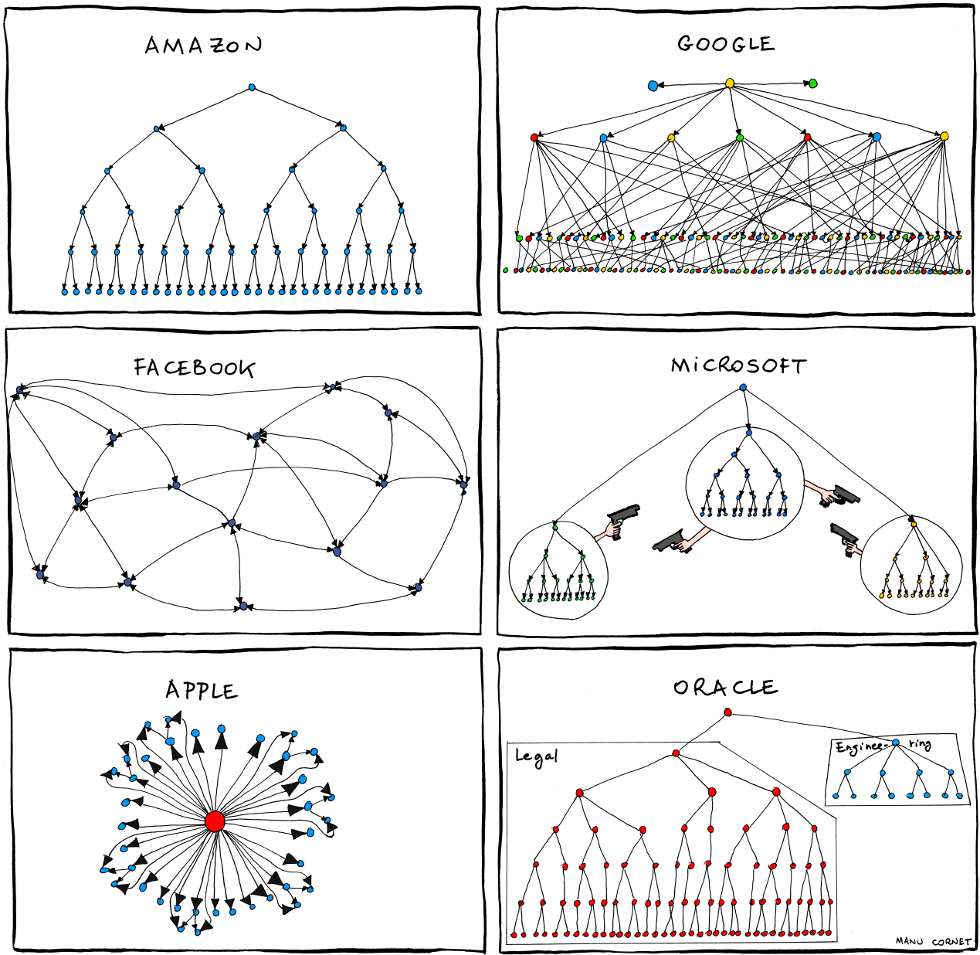
I love how Google looks like an MLP. I suspect their leadership would agree with that portrayal. You can imagine the activation functions: "Will this get me promoted?" "Will this get us bad press?"
  To do so, attach the following notices to the program. It is safest 1 to
  attach them to the start of each source file to most effectively 2 state
  the exclusion of warranty 3; and 4 each 5 file 6 should 7 have 8 at 9 10
  least 11 the 12 "copyright 13 line 14 and 15 a 16 pointer 17 to 18 where
  19 the 20 full 21 notice 22 is 23 found 24.
Looks like it messed-up and they're just for padding, remove them and it makes sense.
I never noticed that before.
As such, I propose a replacement :) :
    To accomplish this, append the following warnings to the software. It is
    safest to place them at the beginning of each source document to clearly
    declare the exclusion of guarantees; plus every single file must include
    a minimum of the "copyright" text and a link detailing the full warning.
The more popular your software is, the more likely you'll get bug reports from people with just bad hardware. I know a few applications now that perform a simple memory/CPU test when sending a bug report and reject those that are basically impossible.
Firefox was the only program that was crashing on my "Vmin Shift Instability" bugged CPU. Before I even knew what the culprit was, I filed a bug report with Firefox and the first question they asked me was if my CPU was a Raptor Lake (it was).
It's mind blowing for me whenever the hardware abstraction leaks like this. You (ie Firefox) had to call the instructions in a specific order to cause the hardware to fail.
It does make sense that a browser, being the thing most people would be running all day, basically fuzzes CPUs for free... they generate their own CPU instructions at runtime from the JIT engine(s), and different styles of webpages could cause every possible combination of instructions to appear throughout the day on every machine.
This is right. There's a reason people squat domain names that differ from well-known ones by a single bit flip. Think of how many old, shitty phones there are in the world, built using the cheapest available components and running in someone's crumb-filled, humid pocket right next to their magnetic key fob thing.
I meant that it's a difficult comparison between platforms without having all the details like memory latency, how the memory controller load increases latency (can increase by 4x on some platforms), cache latency, TLB entries, etc.
Extremely high bandwidth is great for copying data, but not as relevant for walking chains of pointers, where latency/cache/TLB entries are more important.
So just saying "high bandwidth == better" is true when other variables are the same, but they rarely are, especially in comparison to x86-64 offerings.
All of these are independent that it is a SoC with on-package DRAM.
It installed and runs perfectly on my VM with an RTX 4080 passed-though using VFIO. It uses the nvidia module rather than nouveau (at least on my GPU).


1) Colors > Components > Decompose > LAB
2) For the layers of the A/B (chroma) channels, Colors > Levels > "Auto Input Levels" (maximize the contrast), and move the mid point to the median.
3) Colors > Components > Compose > LAB
reply